
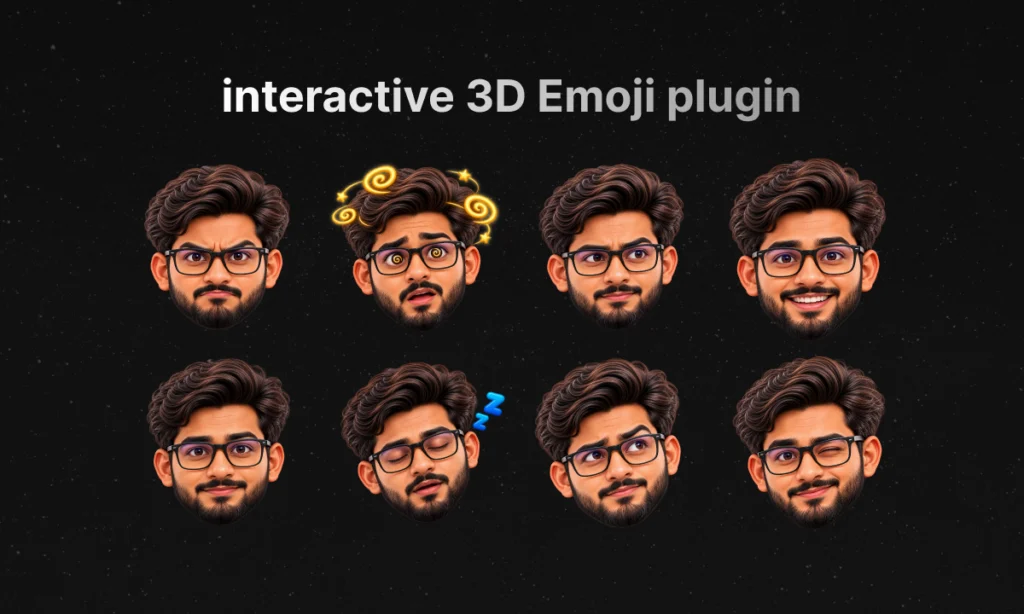
I built an interactive 3D emoji plugin for my WordPress website by turning my own UX idea into working code with OpenAI Codex. The character responds to selected visitor actions, changes expression, and offers contextual guidance around forms, buttons, images and page sections. My aim was to give motion a useful job: help people understand the website and feel more confident about what to do next.
I am Muhammad Hamaeel, Founder of Kllakar and a Design Director & UI/UX Designer. This project started with a question I kept coming back to: could a character on my website do something more helpful than simply move around?
The result is a personal experiment in human-directed AI development. I supplied the idea, visual direction, interaction rules and feedback. Codex implemented the code under my direction. I call that vibe coding, but the work still involved reviewing behavior, finding mistakes and refining the experience.
Why I Wanted Something More Useful Than Decorative Animation
I enjoy expressive websites. A small visual reaction can make a digital experience feel more personal. However, when every element moves simply to attract attention, visitors can end up competing with the interface instead of using it.
A person arriving at a service website usually has practical questions. What does this company offer? Where can I see relevant work? What information should I enter in the form? Which action takes me to the next step?
I wanted my character to respond to those moments. Its personality should support the content and navigation. If an animation has no clear purpose in the current context, it does not automatically deserve a place in the experience.
This plugin is my own implementation for Kllakar. Interactive mascots and website companions already exist, and inspiration can come from many places. I am sharing my specific idea, decisions and development process rather than claiming that nobody has ever explored a similar concept.
What Is the Interactive 3D Emoji Plugin?
It is a custom WordPress website companion built around a consistent illustrated version of my own character. Different expressions represent states such as welcoming, focused, thinking, happy, dizzy and sleeping.
The “3D” description refers to the character’s rendered visual style. The website displays character image assets; it is not running a fully modeled, real-time 3D avatar engine. That distinction matters because it explains both the appearance and the implementation approach.
The plugin connects those expressions to predefined events and contextual text. Visitors can encounter guidance while exploring relevant content or interacting with supported controls. They can also turn the assistant off.
You can explore the current implementation on Kllakar’s website. The desktop experience is the best place to try its cursor-based interactions. Touch devices have different constraints, and the same desktop tooltip behavior is not enabled on every mobile screen.
How the Character Responds to Visitor Actions
Idle and sleep behavior
When a desktop visitor becomes inactive, the character can switch to a sleeping expression. Activity wakes it again. This gives the companion a recognizable state without needing constant movement or an endless attention-seeking animation.
Sleep is a playful response to inactivity, not a warning that someone has done something wrong. The website should remain usable whether the visitor notices the character or ignores it.
Mouse movement and playful reactions
On desktop, the companion responds to pointer activity. A sufficiently energetic mouse shake can trigger a dizzy reaction. The interaction adds personality, while rules and thresholds prevent ordinary movement from producing the same response all the time.
I wanted those reactions to feel understandable. Moving the cursor should not cause a stream of unrelated emotions or interrupt the task the visitor came to complete.
Form guidance and feedback
Forms are one of the most useful places for contextual assistance. A visitor may need to know what to enter, where a problem occurred or whether an action requires attention. The character can offer a short field-related hint and change expression when supported validation or form feedback events occur.
For example, a validation issue can trigger a concerned expression and a prompt to check the field. The expression is an additional cue; clear labels, validation messages and accessible form behavior still need to do their own jobs. A happy face alone cannot prove that an email was delivered or that an inquiry reached someone’s inbox.
Sections, project cards and images
The companion also provides guidance tied to the area being explored. On a project card, the useful message relates to opening that project. On an image, it can use the existing image description. In a gallery, the guidance can explain the action available for taking a closer look.
This is where contextual accuracy matters more than visual novelty. The same generic sentence should not appear everywhere simply because the character is present.
A Real UX Lesson: A Tooltip Must Describe What Actually Happens
During refinement, a service preview displayed a message telling visitors to use video controls to play or pause. That preview was decorative media inside a service card and did not provide those controls.
The sentence sounded helpful, but it described an action the visitor could not perform. I spotted the mismatch and had it corrected so the card’s guidance relates to the service instead. Play-and-pause guidance belongs on media that actually exposes those controls.
This small example captures the larger lesson of the project. An assistant becomes useful when its guidance matches the interface. Animation and friendly wording cannot compensate for a misleading instruction.
It also shows why human review remains essential when working with AI. Generated code and copy can be plausible while still being wrong for a particular component.
How This Approach Can Support Better UX
Contextual guidance can reduce uncertainty by placing a short explanation near the moment someone needs it. Instead of asking visitors to work out every interface detail alone, the website can provide a relevant cue when they encounter a field, section or action.
A recognizable character can also create continuity. Different parts of the site feel connected through a consistent visual identity and tone. For Kllakar, using my own character makes the companion feel related to the person behind the business.
The intended benefits are clearer next steps, more understandable feedback and a more approachable experience. These are design goals, not measured conversion results. I have not established that the plugin increases leads, improves engagement by a specific percentage or makes every visitor complete tasks faster.
To evaluate those outcomes properly, I would compare task completion, form errors, abandonment and visitor feedback with and without the assistant. The important question is whether it helps people, not whether it produces more movement on screen.
I Built It Entirely Through Vibe Coding with Codex
I want to be transparent about the implementation: the idea and direction were mine; Codex wrote the code for me. I did not hand-code the plugin and then use AI only to tidy up a few lines. I used natural-language instructions to describe what I wanted, reviewed the results and kept refining them.
OpenAI describes Codex as a coding agent that can help write, review and debug code. In this project, it helped translate interaction ideas into a WordPress implementation.
My role was to decide what the character should communicate, when it should react, which interactions were unnecessary and how closely the result matched the intended experience. Codex handled implementation tasks based on those decisions.
The practical cycle was straightforward:
- Define the visitor’s situation and the purpose of the interaction.
- Describe the expected behavior to Codex in clear language.
- Review the working result on the website.
- Identify incorrect messages, distracting motion or missing context.
- Ask for a focused correction and verify the affected behavior again.
That process made the project possible for me in a different way, but it did not remove responsibility. I still needed to recognize a UX problem, explain it and judge whether the correction was useful.
AI Helped Build the Plugin; It Does Not Need to Think About Every Hover
There is another useful distinction: using AI to develop a website feature does not mean that feature must call an AI model every time someone moves a mouse.
The companion’s normal reactions and tooltips use browser events, predefined rules, existing page information and configured descriptions. It is not a live AI conversation interpreting a visitor’s emotions. The character’s expressions are interface feedback, not an assessment of how a person feels.
This approach keeps the experience predictable. For familiar actions, a clear rule is often more appropriate than generating a new answer each time. AI helped with implementation, while ordinary application logic handles the interaction.
Performance, Accessibility and Restraint Are Part of the Design
My focus was to avoid unnecessary animation and limit the work needed for useful interactions. The implementation uses image-based character states, delayed hover guidance and event-driven behavior. It does not require a real-time 3D scene just to display a different expression.
Those are implementation choices, not proof of zero performance impact. Images and JavaScript still have a cost, and performance should be measured on real devices and connections. I do not have a published before-and-after benchmark establishing the plugin’s speed impact.
The same restraint applies to accessibility. Reduced-motion handling, keyboard-related guidance and the option to disable the companion are useful considerations, but they do not establish complete accessibility compliance. Essential instructions should remain visible in the interface rather than being available only through a tooltip.
Desktop pointer interaction also needs a separate decision from touch interaction. A small mobile screen should not inherit every desktop effect simply because the code can display it.
Human Ideas and AI Implementation Can Work Together
For me, this project demonstrates a practical way AI can support UX work. A human identifies a need, defines the experience and reviews the result. AI helps turn those decisions into software and makes revisions easier to carry out.
The quality comes from that feedback loop. A clear idea gives the implementation direction. Testing reveals what the first version missed. Human judgment decides which changes actually improve the experience.
Vibe coding is most useful to me when it creates room to explore a considered idea, rather than becoming a reason to publish the first generated result without checking it.
What This Means for Your Business Website
Your business may not need an emoji companion. It may need clearer service pages, a simpler inquiry form, stronger navigation, better mobile layouts or more useful feedback after an action.
At Kllakar, I approach website design and development through those practical questions: what are visitors trying to understand, what gets in their way, and how can the interface make the next step clearer?
I can help translate your business goals into a website experience with appropriate branding, content structure and interaction design. Where a custom feature serves a real purpose, it can be designed around your users instead of added purely as decoration.
Explore selected Kllakar projects or tell me about your website. We can discuss what your visitors need and which improvements make sense for your project.
Frequently Asked Questions
What does an interactive emoji WordPress plugin do?
In this implementation, it displays a branded character, switches expressions in response to selected events and offers contextual guidance around supported website content and controls.
Was this plugin built with AI?
Yes. I developed it through vibe coding with OpenAI Codex. I provided the idea, visual and UX direction, requirements and review; Codex implemented the code under that direction.
Does the character use live AI to answer visitors?
The normal tooltip and reaction system uses predefined behavior and page context. It does not require a live language-model response for each hover or expression.
Does adding a character automatically improve UX?
No. It needs a clear purpose, accurate guidance and appropriate behavior. Its effect on usability should be tested; a decorative character alone does not establish better outcomes.
Can this plugin improve Google rankings or guarantee AdSense approval?
No plugin character guarantees rankings, AI-search citations, virality or AdSense approval. Google’s guidance for AI search features emphasizes established SEO foundations and useful content. Monetization also depends on the site and its compliance with AdSense policies.
Can Kllakar create custom interactions for another website?
Yes, we can discuss a custom interaction as part of a website design and development project. The starting point is the user’s task and the business need, followed by an appropriate implementation and verification plan.
My takeaway: AI can help us build more thoughtful website experiences when human ideas, context and review guide the work. This character is one example of that collaboration—and I will keep judging it by how useful its guidance is.